Professional AV over IP • Dante Audio • Control Systems
Home Products
Brands
DesignProAllen & HeathYamahaFBT AUDIOShureTOA
Video Systems
FIXED HDMI MatrixVideo ProcessorAV Over IPSplitter, Switcher, ConverterLED DisplayPTZ CameraControl PTZ CameraKVM Systems
Audio Systems
MixersInterfacesProcessorsMicrophonePower AmplifiersSpeakersPortable PA SystemsDigital Audio ProcessorPaging & Conference
Control Systems
Central ControlPower SequencerRS232 / TCP-IPTouch Panel
Accessories
AdapterRackSpeaker StandMicrophone StandCablesPower Management Brands Solutions Projects About Company Profile OEM / ODM Partnership Certifications Warranty Blog & News Technical Docs Contact Promotion Get Quote ภาษาไทย
Home Products Video Systems QSC LED Display J9

QSC LED Display J9

Video Systems
★★★★★ 4.9 (45 Reviews) SKU: QSC-LEDWAL-J9

Professional LED Display from QSC. LED Display for enterprise AV installations. Reliable performance, full warranty.

🎚
LED Display Type
🎵
QSC Brand
📶
J9 Series
🔌
Dante Built-in
฿ 9,400
(Excl. VAT 7%)

Contact Channels

Get in touch for more details
🛡
1-Year Warranty Official Thai warranty
🚚
Fast Delivery 1-3 business days
🛠
Expert Support Engineer team standby
💳
0% Installment Up to 10 months

OVERVIEW

Professional LED Display from QSC. LED Display for enterprise AV installations. Reliable performance, full warranty.

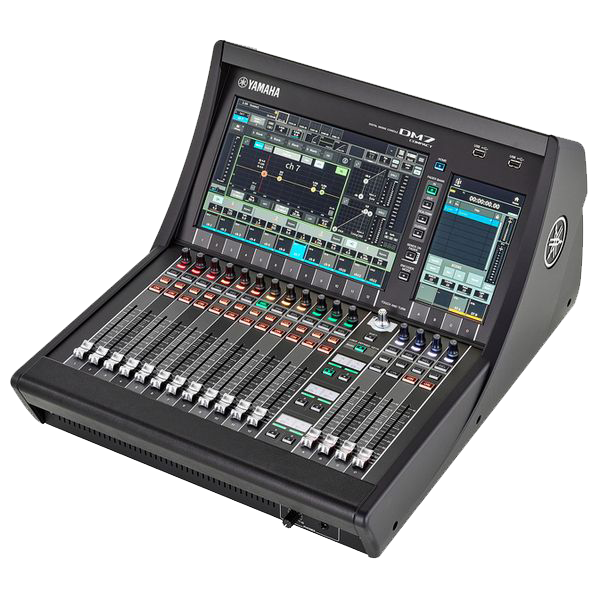
With built-in Dante, dual touchscreens and a powerful processor, QSC-LEDWAL-J9 is the solution that delivers both quality and flexibility.

  • Professional LED Display
  • Industry-standard
  • Full warranty
  • Engineered build
  • 2-year warranty

QSC QSC-LEDWAL-J9

THE NEXT GENERATION DIGITAL MIXING SYSTEM

🎚

KEY FEATURES

🎚
144 Input Channels

Up to 144 input channels

🖥
Dual Touchscreen

Dual Touchscreen 12" + 7"

🔌
Dante Built-in

Dante 512x512 Channels built-in

High Quality Effects

High-quality SPX effects

🔄
Flexible I/O

Flexible expansion I/O

🛰
AES67 Support

AES67 ready for AV over IP

TECHNICAL SPECIFICATIONS

ModelQSC-LEDWAL-J9
BrandQSC
CategoryVideo Systems
Display TypeOLED
Display Size98"
Resolution3840 × 2160 (4K UHD)
Pixel Pitch (LED)2.5 mm
Brightness700 cd/m²
Contrast Ratio4000:1
Refresh Rate60 Hz
Viewing Angle178° / 178°
InputsHDMI × 2 + USB
Touch TechnologyInGlass™ 40-point
Operating SystemwebOS
Operating Hours/Day18/7
Power Consumption85 W
Power SupplyAC 100–240V, 50/60Hz
Dimensions (W × H × D)200 × 66 × 465 mm
Weight4.1 kg
Warranty3 Years
Country of OriginJapan
TypeLED Display
SeriesJ9

DOWNLOADS

QSC-LEDWAL-J9 Brochure
Preview PDF Download
QSC-LEDWAL-J9 Data Sheet
Preview PDF Download
QSC-LEDWAL-J9 Technical Specifications
Preview PDF Download
QSC-LEDWAL-J9 Owner's Manual
Preview PDF Download
QSC-LEDWAL-J9 Dante Guide
Preview PDF Download

PRODUCT VIDEO

QSC-LEDWAL-J9 Overview ▶ YouTube
AV Expert Team Online · Avg. reply 2 min
LIVE
A

Hi 👋 Interested in QSC-LEDWAL-J9? How can I help?

Just now

Product Features

  • Professional LED Display
  • Industry-standard
  • Full warranty
  • Engineered build
  • 2-year warranty

TECHNICAL SPECIFICATIONS

ModelQSC-LEDWAL-J9
BrandQSC
CategoryVideo Systems
Display TypeOLED
Display Size98"
Resolution3840 × 2160 (4K UHD)
Pixel Pitch (LED)2.5 mm
Brightness700 cd/m²
Contrast Ratio4000:1
Refresh Rate60 Hz
Viewing Angle178° / 178°
InputsHDMI × 2 + USB
Touch TechnologyInGlass™ 40-point
Operating SystemwebOS
Operating Hours/Day18/7
Power Consumption85 W
Power SupplyAC 100–240V, 50/60Hz
Dimensions (W × H × D)200 × 66 × 465 mm
Weight4.1 kg
Warranty3 Years
Country of OriginJapan
TypeLED Display
SeriesJ9

DOWNLOADS

QSC-LEDWAL-J9 Brochure
Preview PDF Download
QSC-LEDWAL-J9 Data Sheet
Preview PDF Download
QSC-LEDWAL-J9 Technical Specifications
Preview PDF Download
QSC-LEDWAL-J9 Owner's Manual
Preview PDF Download
QSC-LEDWAL-J9 Dante Guide
Preview PDF Download

Product Video

No video available.

Recommended Accessories

  • Network Switch
  • Rack Cabinet
  • Power Sequencer
  • Touch Control Panel
  • Cable Management Kit

Customer Reviews

No public reviews yet.

Q&A

Q: Do you offer installation and design?
A: Yes — we handle full design and installation.

Q: How to request a quote?
A: Click "Request Quote" or message LINE.

; if(btn) btn.classList.add('active'); } p.classList.add('active'); if(btn) btn.classList.add('active'); }